Pango Sheep: Count & Play
- 4.3
- Rating
- 10.00K
- Installs
- $5.99
- Price

 Analysis by App-foxy
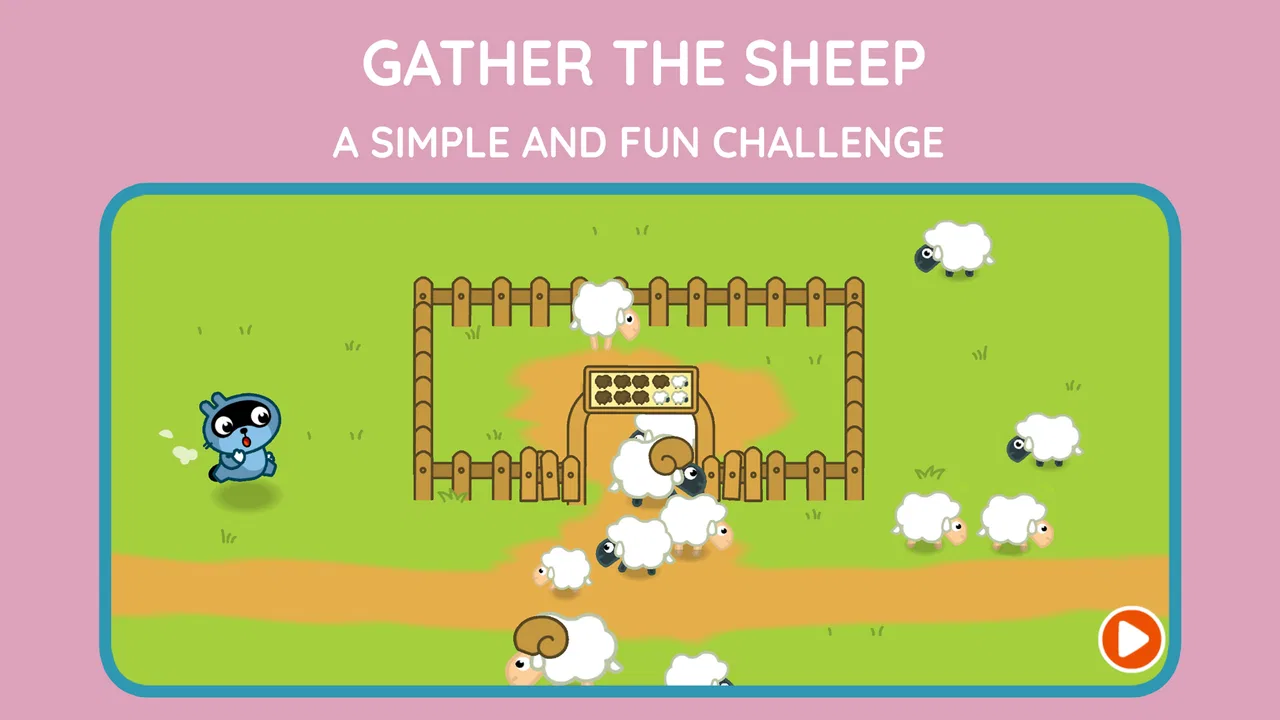
I spent time with Pango Sheep: Count & Play as a short, child-friendly learning game rather than as a conventional action title. Its basic idea is easy to understand: children move through five playful worlds, look for sheep, and practise numbers along the way. That simple structure is also its strongest quality. A young player can usually understand the immediate goal without needing to read a long explanation or manage a complicated menu.
This is an educational game for preschool children, published by Studio Pango - Kids Fun preschool learning games. It is available for Android and sits in a very specific space: a paid, focused activity for early learners who may enjoy exploring more than completing formal lessons. The age classification is Everyone, and the current version is 1.6.2. I would describe it as a gentle first step into number-based play, especially for families who want something more purposeful than a purely distracting game.
The purchase context matters here. The game costs $5.99, so it is not competing with a free download in the same way as many preschool apps. That price makes the decision less about collecting another quick activity and more about whether this particular style of play suits your child. It has reached over 10 thousand installs, with a 4.3 average from around 140 ratings and 10 reviews. Those figures suggest a small but generally positive audience, although I would not treat them as a substitute for checking whether your child likes this kind of quiet exploration.
You May Also Like

 Blood Strike: 2.5 Anniversary
Blood Strike’s Loadouts Turn Every Drop Into a Tactical Gamble
A close look at Blood Strike’s custom loadouts: how fast access to signature weapons reshapes its battle royale rhythm, rewards preparation, and narrows the gap between fights.

 Pandora - Music & Podcasts
Pandora’s Music Is Easy to Start, but Harder to Recover
Pandora’s strength is its low-effort path from a seed to a station. Its weak spot is how much confidence it asks you to place in connection, setup, and quiet recovery.

 8 Ball Pool
 Is Built on Rivalries, Rematches, and Routine
A close look at the rivalries, rematches, shared routines, and unanswered safety questions that turn a quick pool match into a persistent mobile community.

 Samsung Music
’s Quiet Strength Is Playing What You Already Own
Its reach comes less from spectacle than from dependable access to a personal library. That simplicity is both the app’s strongest retention engine and its ceiling.

 AccuWeather: Weather Radar
AccuWeather Review: A Quick, Clear Forecast for Everyday Decisions
For everyday plans, the best forecast is the one you can understand quickly. AccuWeather makes rain timing, radar, and local conditions easy to act on, with a few trade-offs.

 Hill Climb Racing
Why Hill Climb Racing Still Turns Crashes Into One More Run
A tiny car, a bumpy hill and one more upgrade: Hill Climb Racing keeps resurfacing because its simple chaos makes every near-miss feel personal.
More From Our News Desk
View All News


How the five worlds turn counting into play
The central loop is deliberately modest. Instead of presenting a page of arithmetic exercises, the game places counting inside an exploration task: children search for sheep while moving through different worlds. That gives the numbers a reason to matter. A child is not simply being asked to repeat a sequence; they are looking, noticing, and connecting the act of finding with the act of counting.
In my experience, this kind of design works best when an adult first plays alongside the child for a few minutes. I would avoid immediately correcting every response. It is more useful to ask, “How many did you find?” and let the child point, speak, or try again. The search itself creates natural pauses for conversation, and those pauses can support number recognition without making the session feel like homework.
The five-world format gives the experience a sense of movement. Even when the underlying learning goal remains consistent, a new setting can help a preschooler feel that they are beginning another little adventure. This is particularly useful for children who lose interest when an app repeats the same screen too often. At the same time, parents should keep expectations realistic: the game’s value comes from repeated, relaxed practice, not from a large curriculum covering every early mathematics skill.
A useful home routine is to play one world, stop, and ask the child to count ordinary objects away from the screen. For example, after finding sheep, you could count socks, toy blocks, or pieces of fruit together. That turns the game into a starting point for real-world transfer. The app can provide the prompt, but the adult helps the child understand that counting is not limited to virtual animals.
What a normal play session feels like
A realistic session might happen while a parent is preparing dinner and needs a calm activity nearby. I would let the child explore one section, then sit down for the final few minutes and ask them to show what they discovered. That approach keeps the game from becoming background noise and gives the child a chance to explain their choices. It also lets the adult notice whether the child is genuinely counting or simply tapping until something happens.
For a younger preschooler, the most useful interaction may be naming what is visible and counting slowly together. An older preschooler may be ready to take more control and answer independently. The same activity can therefore work differently depending on language development, attention span, and familiarity with numbers. I would not use it as a test. If the child becomes frustrated, ending the session and returning later is more productive than pushing through.
One practical tip is to keep the device at a comfortable distance and use a quiet setting. Searching for objects requires attention, and a busy room can make the task feel harder than it really is. Another is to let the child lead the search before offering hints. If an adult points out every sheep immediately, the game loses part of its discovery value and the child gets less practice scanning the scene.
The game is also better suited to short bursts than to a long sitting. Preschool children often benefit from stopping while the activity is still enjoyable. Because the goal is simple, there is no need to force a complete marathon session. A few minutes of focused play followed by a conversation or an offline counting activity can be more valuable than leaving the game running for an extended period.
Progress without pressure
What I appreciate most is the absence of an obvious competitive framing in the basic premise. Finding sheep and learning numbers can feel like a shared discovery rather than a race against another player. For a child who is easily discouraged by scores, timers, or failure screens, that gentler tone is a meaningful advantage.
There is also a trade-off. Children who need visible goals, unlockable rewards, or a strong sense of advancement may find the experience less exciting than a broader preschool platform. The five worlds provide structure, but they do not automatically create the kind of escalating challenge found in a more game-focused product. Parents should choose it for calm repetition and exploration, not for intense progression.
I would use the game as one part of a learning routine rather than as a complete teaching tool. It can reinforce the habit of counting and help a child associate numbers with objects, but it should sit alongside picture books, physical toys, drawing, and everyday questions. If your main aim is handwriting, phonics, shape recognition, or a broad lesson plan, a dedicated learning suite may offer more coverage.
Another important point is that progress may be difficult for an adult to judge from casual observation. A child can appear busy and engaged without necessarily understanding the number task. Watch how they respond when you ask them to count the sheep aloud, or whether they can repeat the idea with toys away from the screen. That small check tells you more than simply seeing them navigate successfully.
Fairness and the value of a paid download
At $5.99, the game asks for an upfront purchase rather than presenting itself as a free activity. I see that as a reasonable model for parents who prefer making one clear buying decision, especially when they want to avoid evaluating a child’s experience around repeated spending prompts. A paid game can also feel easier to hand over for independent play because the purchase is made before the child starts.
Still, the price is only fair if the format matches your needs. This is a narrowly focused preschool game about exploring, finding sheep, and practising numbers. A family looking for a large collection of subjects may get better value from a broader educational app, even if that alternative uses a different payment model. Conversely, a parent who wants one calm, specific activity may prefer this focused approach over a crowded bundle.
I would make the purchase decision based on the child’s temperament. If your child enjoys looking carefully through scenes and repeating a simple task, the focused design has a good chance of being used. If they quickly demand new mechanics, dramatic rewards, or rapid challenge changes, the same simplicity may make the purchase feel disappointing. The key question is not whether the game contains many systems; it is whether its small system fits your child.
There is no reason to treat the rating as proof that every child will respond in the same way. The 4.3 average is encouraging, but the audience is comparatively small, with around 140 ratings. I would read that as a positive signal rather than a guarantee. Preschool games are especially dependent on age, motor skills, language, and a child’s individual taste.
Competitive fairness and screen-time choices
This is not a competitive multiplayer experience, and its appeal does not depend on beating other children. That makes it a fairer choice for a family that wants learning without comparison. A child can concentrate on their own discovery instead of feeling that they are behind a sibling or an online player.
That does not mean the game is automatically the best choice for every family. If you are trying to encourage cooperative play between two children, a physical counting game may work better because both children can handle the objects and negotiate the rules together. This app is more naturally suited to one child with one adult nearby, or to independent exploration after the child understands the basic interaction.
I also would not use it as a reward for every completed household task. When a learning game becomes the only attractive screen option, the child may focus on access rather than the activity itself. A better pattern is to offer it occasionally, keep sessions predictable, and connect the on-screen counting with something tangible afterward. That preserves its educational purpose without turning it into a bargaining chip.
What parents should check before buying
The game was released on December 10, 2015, and the minimum operating-system requirement is 7.1. Families using an older supported device should check that the device can install and run the current version comfortably. The listed version is 1.6.2, so I would also make sure there is enough storage and that the device is updated through the normal app-store process before handing it to a child.
Because the app is designed for preschoolers, I recommend setting up the device first rather than giving the child full access to the phone or tablet. Turn on the device’s child-safety controls, keep notifications out of the play area, and demonstrate the basic gestures yourself. These steps are useful not because the game is unusually complicated, but because a preschooler can easily leave an activity by touching a system control or another app.
Parents may also wonder whether the game can replace adult guidance. I would say no. It can support practice, but the strongest learning moments happen when someone asks the child to explain what they found. If your child is still learning to speak clearly, pointing and touching can count as participation too; you can supply the words without taking over the task.
Another sensible question is whether it is appropriate for a child who already counts confidently. It may still be enjoyable as a search game, but its educational benefit could be smaller if the child needs addition, subtraction, or more advanced number challenges. In that situation, I would choose a more demanding mathematics app or use this one only as a relaxed warm-up.
Children who struggle with visual searching may need extra patience. Rather than telling them where every sheep is, use broad hints such as “look near the other side” and give them time to scan. If the child remains frustrated after several attempts, that is a sign to switch activities, not evidence that they are failing. The app’s calm premise does not remove the need to match difficulty to the child.
Where it fits among preschool alternatives
Compared with a worksheet, the game offers more movement and discovery. A worksheet may be better for a child who enjoys pencil work or for an adult who wants to see each answer directly on paper, but it can feel static. Here, the search for sheep gives counting a playful context and may hold attention more effectively for a child who resists formal exercises.
Compared with a broad preschool subscription or learning bundle, this title is more limited but also less cluttered. A large suite may cover letters, colors, puzzles, music, and mathematics in one place. That is useful for families wanting variety, yet it can make it harder to focus on one skill. This game makes more sense when you want a small, specific counting activity rather than an entire digital classroom.
Compared with a competitive number game, it is likely to feel less stressful but also less motivating for children who enjoy scores and fast feedback. I would choose this one for a child who benefits from a slower pace and choose the competitive alternative only when the child can handle winning, losing, and repeated challenge without becoming upset.
My trust verdict for families
After using it, I see Pango Sheep: Count & Play as a focused purchase with a clear purpose, not as an all-in-one preschool solution. Its strongest case is a young child who enjoys exploring scenes, can engage with a simple search task, and needs gentle opportunities to practise counting. The five-world structure gives the activity enough variety to feel like a small journey while keeping the learning idea understandable.
The main limitation is equally clear: the experience is narrow. Families expecting a wide academic program, deep progression, or a constantly changing set of challenges should look elsewhere. I would also skip it if the child dislikes searching games or already needs more advanced mathematics. In those cases, a broader educational app, physical manipulatives, or guided activities with an adult would be a better use of the budget.
For the right child, however, the paid model and calm focus are appealing. You know the purchase is $5.99, the age classification is Everyone, and the app comes from Studio Pango - Kids Fun preschool learning games. Its 10K-plus installs and 4.3 average show that it has found a modest, generally favorable audience, while the small review count is a reason to rely on your child’s learning style rather than popularity alone.
My recommendation is to treat it as a short, repeatable counting companion. Play alongside your child at first, ask them to explain what they found, and follow the screen activity with real objects they can count. Used that way, it earns its place as a gentle educational game. Used as a substitute for wider learning or active adult interaction, it will probably feel too limited. For preschool exploration without competitive pressure, I think it is a sensible choice when its focused design is exactly what your family wants.
FAQs for Pango Sheep: Count & Play
01What is Pango Sheep: Count & Play, and what age group is it designed for?
Pango Sheep: Count & Play is an educational game for young children that combines simple counting activities with playful interactions involving sheep and colorful scenes. It is mainly aimed at preschoolers and early learners, generally around ages 3 to 6, although younger children may enjoy the visual activities with adult guidance. The interface is designed to be accessible, with little reading required.
02What skills can children practice while playing Pango Sheep: Count & Play?
The game focuses primarily on early numeracy, helping children recognize quantities, count objects, and connect numbers with visual groups. Depending on the activity, children may also practice attention, observation, hand-eye coordination, and basic problem-solving. Because the tasks are presented through playful animations rather than formal lessons, the app can be a gentle way to reinforce counting concepts without making children feel like they are completing traditional homework.
03Is Pango Sheep: Count & Play suitable for children who cannot read yet?
Yes, the game is generally suitable for preschool children who are still learning to read. Its activities rely heavily on illustrations, touch controls, animations, and intuitive visual instructions instead of long written explanations. Younger players may still need an adult to demonstrate the first few activities or explain what to do, but children can usually continue exploring independently once they understand the basic interaction pattern.
04Does Pango Sheep: Count & Play contain advertisements or in-app purchases?
The availability of advertisements, paid features, and purchase requirements can depend on the version and platform from which the game is downloaded. Parents should check the current Google Play or App Store listing before installing, especially if they want an entirely uninterrupted experience. It is also sensible to review the device’s parental controls and disable unauthorized purchases, since children’s apps may be used on shared phones or tablets.
05Can children play Pango Sheep: Count & Play without an internet connection?
In many cases, a game of this type can be played offline after it has been installed, which makes it convenient for travel, waiting rooms, or areas with limited connectivity. However, internet access may still be required for the initial download, updates, restoring purchases, or viewing store information. Since offline behavior can change between releases, parents should test the installed version before relying on it during a trip.
Pros
- Simple counting activities are suitable for preschool-aged children.
- Cute sheep characters make the learning experience inviting.
- Short activities work well for brief play sessions.
- Tap-based controls are easy for young children to understand.
- Offline play is convenient for travel or areas without internet.
Cons
- The content may feel too basic for children who already count confidently.
- Limited variety can reduce replay value after repeated sessions.
- Some activities offer little challenge for older preschoolers.
- Parents may want more progress tracking and learning feedback.
- Compatibility and availability may vary across newer devices.

Pango Sheep: Count & Play
Gallery